Sunday, November 9, 2014

ICT week 6: Turtle graphics, Sensors of light and washing machines, control examples and robotics

Turtle graphics
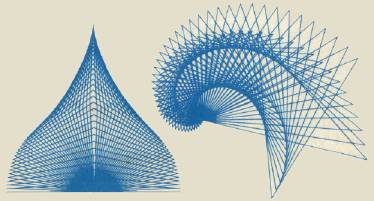
Turtle graphics was first developed in 1967 as a way to teach children basic computer programming. A curser (called a turtle) can controlled and moved around the screen by inputting simple commands. As the curser moves around the screen it draws a line. These are the comments: 

And here is one example on how to draw turtle graphics:

HOW TO MAKE IT:
PENDOWN
FORWARD 60
RIGHT 90
FORWARD 60
RIGHT 90
FORWARD 30                          
RIGHT 90                                
FORWARD 30
LEFT 90
FORWARD 30
RIGHT 90
FORWARD 30


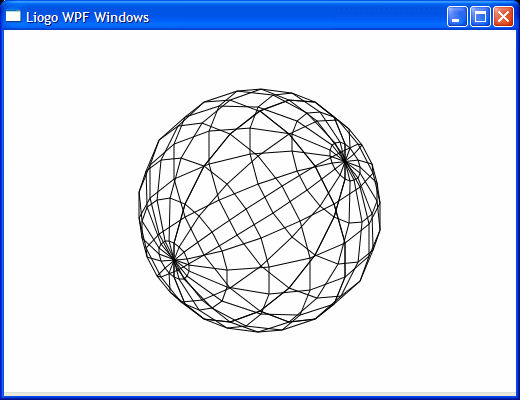
Other results by turtle graphics: 


Sensors
1. Light
The Light Sensor is a passive devices that convert this “light energy” whether visible or in the infra-red parts of the spectrum into an electrical signal output. Light sensors are more commonly known as “Photoelectric Devices” or “Photo Sensors” because the convert light energy (photons) into electricity (electrons). Usually light sensors is controlled by the users in settings. Here is a picture of a light sensor:

2. Washing machines
Sensors in washing machines include Temperature Sensor, Water Level Sensor, Dirt Sensor, Pin out of balance Detector, Leak Detector, Mains Failure Sensor. These sensors helps you to know if there is any problem in the washing machine and it makes you easier to wash your clothes without worrying what might happen.

Control examples: 
Greenhouse control systems:
-Light: When the light in the greenhouse environment is too dark, the light sensors will give a signal to us.
-Heating: The hot water or steam is then transported throughout the greenhouse in pipes.  The pipes can end in a heat exchanger where a fan distributes heated air. The pipes can run along the floor and also be used as cart rails between aisles. Heat will then rise upward through the crop by convection. 
-Cooling: Water cooled pads at the top part of tall towers cool the surrounding air. The cooled air then drops displacing warmer air below.
-Relative humidity: Relative humidity can be increased by running the cooling pads or by fogging.  Relative humidity can be decreased by running the heaters or simply venting. 

Robotics
Nowadays, robots are used to replaced human works. However, robots can never be the same as human. Robots also have some advantages and disadvantages. Here are some advantages and disadvantages of using robots to replaced human works:

Advantages: 
-Decreased overhead costs
-Increased productivity
-Consistency, Reliability, and Accuracy
-High volume production
-Increase in safety

Disadvantages:
-Expensive
-Cannot respond in times of danger
-Overly dependant upon robot technology

Thank you for reading

Credits to:
http://www.ictlounge.com/html/control_applications_turtle_graphics.htm
http://www.electronics-tutorials.ws/io/io_4.html
https://prezi.com/ieqcgm5dde-f/sensors-used-in-washing-machine-and-their-functioning/
http://ag.arizona.edu/ceac/sites/ag.arizona.edu.ceac/files/pls217nbCH13_2.pdf


Saturday, November 1, 2014

ICT week 5: Modelling applications and types of processing

Another name for a computer simulation that mimics real-life situations is a 'computer model'Simulation means to mimic (copy) real life systems in order to see the outcomes of different scenarios. There are some computer simulations that can be created for a range of applications such as: Tuck shop model, traffic light simulation, flight simulation.

1. Tuck shop model: This model is mostly being used in a shop or supermarket. This model usually used a spreadsheet. In this spreadsheet, you can automatically count your loss and profit, number sold, selling price, item name, etc. Here are some examples of a tuck shop model: 

2. Traffic light simulation: This simulation is usually being used for counting the number of vehicles passing the junction in all directions, the time of day for the vehicle count, how many vehicles build up at the junction at different times of the day, how vehicle movements change at weekends, bank holidays, etc., how long it takes a vehicle to clear the junction,how long it takes the slowest vehicle to pass through the junction
the movements made by vehicles (e.g. left turns, right turns, filtering, etc.), additional environmental factors, such as whether there are pedestrian crossings nearby.

From the list of data above, when you entered it to a computer, it will carry out a simulation that can be used for finding a solution.

3. Flight simulator: The simulator allows the pilot to practice the following flight skills:
  • Use of cockpit controls
  • Take off / Land
  • Navigation (following correct path to a destination)
  • Handling different conditions (high wind, storms, engine failure)
At first trainee pilots will make mistakes and maybe even crash the plane.  This doesn't matter because they can simply reset the simulation and try again. Nobody gets hurt. 

When the trainee gains enough experience in the simulator, they will be allowed to fly a real plane.

Advantages of using computer models/ simulations:
  • Cheaper: Modelling a situation is often much cheaper than carrying out the task for real. For example, architects can make and solve design errors on simulated buildings rather than waiting until the real thing is constructed before realizing.
  • Safer: Flight simulators mimic the skills needed to fly a plane. Notice pilots are likely to crash the plane while they are learning. This could be fatal if piloting a real aircraft. If a simulated plane is crashed, they just reload the simulation and try again.
  • Saves time: Simulations can produce results faster than the real thing. For example, global warming models can predict the temperature of the earth in 50 years time without actually having to wait that long.
  • Greater range of simulations: Simulations can be programmed to mimic a wide range of extreme situations. For example, pilots can be exposed to storms, volcanic ash clouds, high winds etc. In real life these conditions cannot be guaranteed.
Disadvantages of using computer models/ simulations:
  • Accuracy: Modelling a situation can never perfectly mimic real life. There will always be some difference between the model and reality.
  • Initial expense: Simulators require sophisticated hardware and software. For example, high powered processors and lots of RAM. The simulation software (program) can also be expensive.  
  • Programmer error: If the simulation's programmer has made errors whilst creating the program, the simulation outcomes will be more inaccurate.


ICT week 4: Safety Aspects

Safety is the most important thing in your life. Here, you will find risk that will happen, what causes it, how to prevent it and how to handle it.

Risks:

  • Electrocution
  • Tripping
  • Heavy equipment falling
  • Fire risk
Cause:
  • Electrocution: Short-circuit, water spilled
  • Tripping: Trip because of trailing wires
  • Heavy equipment falling: Not putting books in the right position so it could easily falls a heavy equipment
  • Fire risk: Short-circuit
Prevention:
  • Do not touch a short circuit wire.
  • Always plug off a short circuit wire before fixing it.
  • Always provide a fire extinguisher in every room
  • Arrange everything nicely (organised)
  • Do not spill liquid on the floor
  • Remove unwanted things from your working place
  • Your back must be perpendicular to your leg when you squat.
  • Hold the handrail if you use the stairs.
  • Check your wires regularly
How to handle it:
  • If there's a fire, go to the exit door, do not use the elevator, or reach for the fire extinguisher.
  • If your friend got an electric shock, get something rubbery to pull him/her.
  • Tidy up the trailing wires.
  • Put the heavy equipment in a shelf and make sure it will not fall next time.

ICT week 3: Printer issues

What is a Printer?
printer is an electromechanical device which converts the text and graphical documents from electronic form to the physical form. Generally they are the external peripheral devices which are connected with the computers or laptops through a cable or wirelessly to receive input data and print them on the papers. A wide range of printers are available with a variety of features ranging from printing black and white text documents to high quality colored graphic images.

Types of printer:
1. Daisy Wheel Printers
Daisy wheel printers - working
Daisy wheel printers print only characters and symbols and cannot print graphics. They are generally slow with a printing speed of about 10 to 75 characters per second. By 1980 daisy wheel printers were the dominant printers for quality printing but since the prices of laser and inkjet printers have declined and quality of dot matrix printers has been improved, the daisy wheel printers are now obsolete. How daisy wheel printers work is very similar to typewriters. A circular printing element is the heart of these printers that contains all text, numeric characters and symbols mould on each petal on the circumference of the circle. The printing element rotates rapidly with the help of a servo motor and pauses to allow the printing hammer to strike the character against the paper. 

2.Dot Matrix Printers
It is a popular computer printer that prints text and graphics on the paper by using tiny dots to form the desired shapes. It uses an array of metal pins known as printhead to strike an inked printer ribbon and produce dots on the paper. These combinations of dots form the desired shape on the paper. Generally they print with a speed of 50 to 500 characters per second as per the quality of the printing is desired. The quality of print is determined by the number of pins used (varying from 9 to 24). The key component in the dot matrix printer is the ‘printhead’ which is about one inch long and contains a number of tiny pins aligned in a column varying from 9 to 24. The printhead is driven by several hammers which force each pin to make contact with the paper at the certain time. These hammers are pulled by small electromagnet (also called solenoids) which is energized at a specific time depending on the character to be printed. The timings of the signals sent to the solenoids are programmed in the printer for each character.
Working of dot matrix printer, how dot matrix printers work

The printer receives the data from the computer and translates it to identify which character is to be printed and the print head runs back and forth, or in an up and down motion, on the page and prints the dots on the paper. 

3.3.      Inkjet printers
Inkjet printers are most popular printers for home and small scale offices as they have a reasonable cost and a good quality Inkjet printerof printing as well. A typical inkjet printer can print with a resolution of more than 300 dpi and some good quality inkjet printers are able to produce full colored hard copies at 600 dpi.
An inkjet printer is made of the following parts:
·         Printhead – It is the heart of the printer which holds a series a nozzles which sprays the ink drops over the paper.
·         Ink cartridge – It is the part that contains the ink for printing. Generally monochrome (black & white) printers contain a black colored ink cartridges and a color printer contains two cartridges – one with black ink and other with primary colors (cyan, magenta and yellow).
·         Stepper motor – It is housed in the printer to move the printerhead and ink cartridges back and forth across the paper.
.       Stabilizer bar – A stabilizer bar is used in printer to ensure the movement of printhead is prĂ©cised and controlled over the paper.
.      Belt – A belt is used to attach the printhead with the stepper motor.
.      Paper Tray – It is the place where papers are placed to be printed.
.      Rollers – Printers have a set of rollers that helps to pull paper from the tray for printing purpose.
.      Paper tray stepper motor- another stepper motor is used to rotate the rollers in order to pull the paper in the printer.
.    Control Circuitry – The control circuit takes the input from the computer and by decoding the input controls all mechanical operation of the printer.
 
Similar to other printers, inkjet printers have a ‘printhead’ as a key element. The printhead has many tiny nozzles also called as jets. When the printer receives the command to print something, the printhead starts spraying ink over the paper to form the characters and images.  There are mainly two technologies that are used to spray the ink by nozzles. These are:
·         Thermal Bubble – This technology is also known as bubble jet is used by various manufacturers like Canon and Hewlett Packard. When printer receives commands to print something, the current flows through a set of tiny resistors and they produce heat. This heat in turn vaporizes the ink to create a bubble. As the bubble expands, some of the ink moves out of the nozzle and gets deposited over the paper. Then the bubble collapses and due to the vacuum it pulls more ink from ink cartridge. There are generally 300 to 600 nozzles in a thermal printer head which can spray the ink simultaneously.
·         Piezoelectric – In the piezoelectric technology, a piezo crystal is situated at the end of the ink reservoir of a nozzle. When printer receives the command to print, an electric charge is applied to the crystal which in turn starts vibrating and a small amount of ink is pushed out of the nozzle. When the vibration stops the nozzle pulls some more ink from the cartridge to replace the ink sprayed out. This technology is patented by Seiko Epson Corporation.
 
An inkjet printer can print 100 to several hundred papers depending on the nature of the hard copy before the ink cartridge need to be replaced.

4.   Laser Printers 
Laser PrintersLaser printers are the most popular printers that are mainly used for large scale qualitative printing. They are among the most popularly used fastest printers available in the market. A laser printer uses a slight different approach for printing. It does not use ink like inkjet printers, instead it uses a very fine powder known as ‘Toner’. The control circuitry is the part of the printer that talks with the computer and receives the printing data. A Raster Image Processor (RIP) converts the text and images in to a virtual matrix of dots. The photoconducting drum which is the key component of the laser printer has a special coating which receives the positive and negative charge from a charging roller. A rapidly switching laser beam scans the charged drum line by line. When the beam flashes on, it reverses the charge of tiny spots on the drum, respecting to the dots that are to be printed black. As soon the laser scans a line, a stepper motor moves the drum in order to scan the next line by the laser.
 
A developer roller plays the vital role to paste the tonner on the paper. It is coated with charged tonner particles. As the drum touches the developer roller, the charged tonner particles cling to the discharged areas of the drum, reproducing your images and text reversely.  Meanwhile a paper is drawn from the paper tray with help of a belt. As the paper passes through a charging wire it applies a charge on it opposite to the toner’s charge. When the paper meets the drum, due to the opposite charge between the paper and toner particles, the toner particles are transferred to the paper. A cleaning blade then cleans the drum and the whole process runs smoothly continuously. Finally paper passes through the fuser which is a heat and presser roller, melts the toner and fixes on the paper perfectly.

Health problems caused by printers:
  • Toner: Laser printers use toner as part of the printing process. The toner is an extremely fine powder, which in itself is not classed as a substance hazardous to health, but any dust in substantial concentration is, as it may cause respiratory tract irritation resulting in coughing and sneezing. Toner dust may become airborne for a variety of reasons; toner dust spilled inside the machine becomes airborne by passing through the ventilation fans into the room, the waste toner compartment fills up and causes toner to back up inside the machine, or the most common, careless renewal of the toner cartridge causes a spill of toner into the room. Toner dust is considered a nuisance dust and should have no health effects other than those noted above. However, persons who have an already compromised respiratory system (e.g. suffer from asthma, bronchitis, etc) should avoid changing toner cartridges. If this is not practicable then the operation should be carried out with extreme caution to avoid generating a dust cloud. 
  • Ozone: Ozone, O3, a form of oxygen, is a normal constituent of the earth’s atmosphere. It is a highly reactive, unstable, colourless gas with a distinctive odour which, at room temperature, decomposes rapidly to oxygen, O2, particularly on contact with furnishings. Ozone cannot be stored or transported in vessels because it decomposes in the presence of oxidisible impurities, humidity and solid surfaces. As ozone is such a highly reactive substance, any adverse health effects will be found essentially at the sites of initial contact; the respiratory tract (nose, throat and airways), the lungs and at higher concentrations, the eyes. The principle health affects are produced by irritation of and damage to the small airways of the lung. Ozone is produced naturally from oxygen whenever sufficient ultraviolet (UV) radiation or electrical discharges occur e.g. the action of lightning or by photo chemical reactions involving oxides of nitrogen and hydrocarbons. 
Recommendations when using printers:
1. Air vented from the machine into the room should be filtered (NB: most 
modern machines incorporate such filters to reduce ozone emission). 
2. Machines should be sited such that exhaust emissions do not travel 
over workstations or personnel. 
3. Ensure regular servicing of the machine. 
4. Consideration should be given as to the adequacy of the ventilation in 
the room i.e. size of room, natural or mechanical ventilation. 
5. Refilling techniques for toner in dry (xerographic) machines should be 
given special attention avoiding spillage wherever possible. 
6. Toner spillages should be cleaned up with care and ideally if persons 
are known to have compromised respiratory systems they should not 
be asked to carry out this task. 
7. Spent toner from a machine should be placed in sealed bags for 
disposal.